GoHighLevel AI Studio Guide: Build Websites, Funnels, and Web Assets With Prompts
The first AI builder where the page you generate is born already connected to your CRM, calendar, and workflows.
A practitioner walkthrough — what AI Studio actually builds, how it compares to Lovable and Webflow AI, and the prompt patterns that produce ship-ready output.
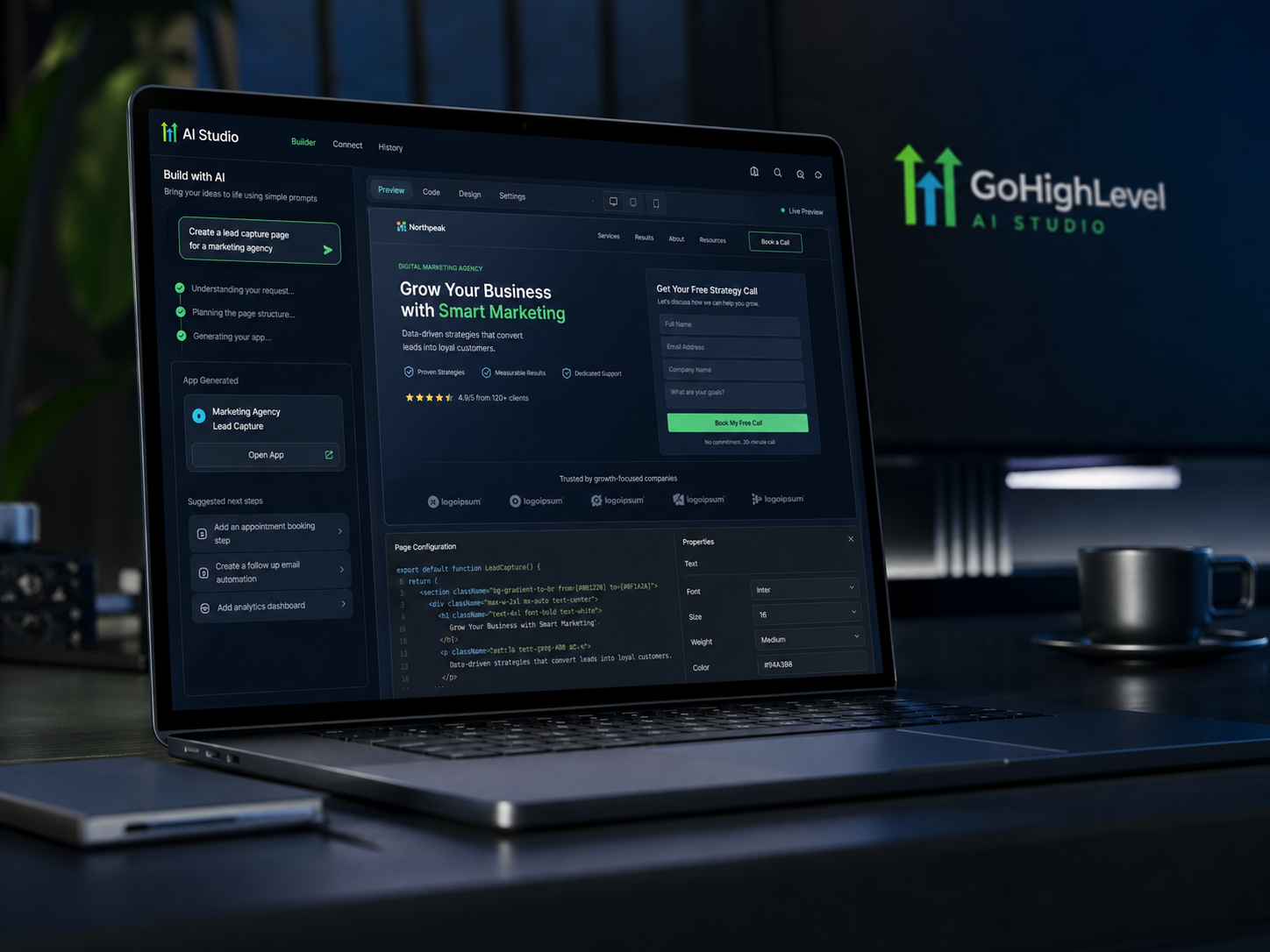
GoHighLevel AI Studio is HighLevel's prompt-driven builder for websites, landing pages, funnels, multi-step surveys, calculators, and other interactive front-end experiences. You describe what you want — or paste a reference URL or upload a template — and AI Studio generates the layout, copy, and (optionally) the visuals. The piece that sets it apart from Lovable, v0, or Webflow AI: the page you build is already inside HighLevel, so it connects natively to your CRM contacts, calendars, forms, pipelines, and workflows the moment you click publish.
TL;DR
- •AI Studio builds front-end web assets from prompts: websites, landing pages, funnels, surveys, calculators, calendar booking flows, branded forms.
- •It's available via Labs in any HighLevel sub-account; included on Starter, Unlimited, and Agency Pro.
- •The differentiator vs. Lovable / v0 / Webflow AI is integration: forms post to your CRM, calendars are real GHL calendars, replies fire workflows.
- •Auto-generates SEO meta titles, descriptions, and alt text — usable as a foundation, worth overriding on money pages.
- •Currently beta-flavored: occasionally retry generations; design polish trails Lovable on pure aesthetics. Best paired with a quick manual cleanup pass.
Contents
Table of Contents
Best fit for...
- •Anyone already paying for HighLevel who hasn't built their own site yet.
- •Agency owners producing client sites at volume who want a consistent stack.
- •Small-business owners who need a real lead-capture page connected to a CRM.
- •Web designers exploring vibe coding who want output they can hand off to a real automation engine.
- •Affiliates/creators publishing landing pages for offers, lead magnets, and quizzes.
Not the right fit if...
- •You want pure design portfolio output and don't care about CRM/automation.
- •You already have a Webflow site you love and don't need it inside HighLevel.
- •You need a deeply custom, design-system-driven product page.
- •You don't have HighLevel and don't want it — AI Studio doesn't sell standalone.
What is AI Studio — and what it is not
HighLevel is already an all-in-one platform for small businesses and the agencies that support them. It includes a CRM, conversations inbox, calendars, websites, funnels, automations, email, SMS, courses, memberships, and more.
AI Studio is the prompt-driven builder inside that same ecosystem. Instead of manually placing every section, you describe what you want to build and AI Studio helps generate the page structure, copy, visuals, and front-end experience.
That makes it useful for landing pages, simple websites, booking pages, lead-capture pages, surveys, calculators, branded forms, and other interactive experiences.
It is also worth separating AI Studio from a few other tools in the platform. Sites is the traditional website builder — block-based and manual. Funnels is used for sales funnels, opt-in pages, and offer-specific flows. Agent Studio is for building AI agents that handle conversations, voice calls, and task-based interactions. AI Studio is specifically for building AI-generated pages and front-end web experiences.
The key difference is that AI Studio is not generating a page in isolation. The page lives inside the same account as your CRM, calendars, forms, conversations, and workflows. That is where the real value starts to show up.
Think of AI Studio as a web-experience workspace
AI Studio is closer to a creative project workspace than a one-time page generator. You can start new projects, reopen recent work, organize projects, use templates, manage starred items, and continue refining what you have already built.
That workflow matters because it gives business owners and agencies a faster path from idea to working page — without separating the page from the CRM system that actually captures and follows up with the lead.
You can start from:
- A natural-language prompt
- A template
- A reference URL or screenshot
- An uploaded file or image
- An existing project you want to refine
AI Studio, in plain English
Open Labs in your sub-account, enable AI Studio, then tell it what you want to build. You can prompt freeform ("build a 3-page chiropractor site with a quiz and calendar booking"), start from a template, paste a reference URL for AI Studio to mimic, or upload an image.
Why It Matters
Other AI builders stop at "the page looks great." AI Studio's pages can collect a lead, book a real calendar slot, drop the contact into a pipeline, and fire a workflow — without leaving HighLevel and without a single Zapier zap.
One platform instead of five
The reason AI Studio matters strategically — not just tactically — is what it lets you stop paying for. Most marketers and small operators today run a stack like Webflow / Wix for the site + Calendly for booking + Typeform or Jotform for capture + Mailchimp for follow-up + a CRM bolted on the side.
AI website builder
replaced by AI Studio for HighLevel-connected sites.
Form builder
replaced by HighLevel native forms.
Booking tool
replaced by HighLevel calendars.
Email follow-up
replaced by HighLevel Email + Workflows.
Glue layer
eliminated for in-stack triggers.
Lead-magnet host / quiz tool
replaceable by AI Studio's interactive experiences.
Your first build, in three steps
Enable AI Studio in Labs
Inside any HighLevel sub-account, go to Settings → Labs. Find AI Studio in the list and toggle it on. Labs is a per-sub-account switch, so if you manage multiple clients, you'll repeat this for each. Once enabled, AI Studio appears in the left nav inside that sub-account.
Generate from a prompt, template, or reference URL
Open AI Studio and start a new project. You have four reliable on-ramps: Prompt from scratch, Start from a template, Reference a URL, or Upload an image. After the first generation, refine with follow-up prompts or open the built-in code editor for surgical changes.
Connect your real GHL assets, then publish
This is where AI Studio becomes more than a page generator. Forms and calendars may appear visually on the page before they are connected to your HighLevel account. To make them functional, click the form or calendar block, ask AI Studio to connect it, or use the Connect prompt when it appears. For forms, the connection flow can create contacts, capture submissions, and support workflows through tracking triggers. For calendars, AI Studio can detect calendars in the sub-account and let you choose the calendar to connect. Before going live, publish to the preview domain first. Send a real test submission and confirm three things: the contact appears in Contacts, the form submission appears under Sites → Forms → Submissions → External Forms, and the correct workflow trigger fires if automation is attached. Only after that should you connect the custom domain or set the primary published URL.
How to trigger workflows from AI Studio form submissions
Once an AI Studio form is connected to CRM tracking, use HighLevel workflows to continue the automation. Create a workflow using the trigger "External Tracking Event," choose the "Form submission" event, then filter by Domain and/or External Form so the workflow only fires from the intended AI Studio page. 1. Create the form layout in AI Studio 2. Connect the form to CRM tracking 3. Create a workflow 4. Choose trigger: External Tracking Event 5. Choose event: Form submission 6. Filter by Domain and/or External Form 7. Add follow-up actions (SMS, email, task, pipeline update)
From AI draft to real HighLevel workflow
The most valuable part of AI Studio is not the first draft. It is the handoff from "generated page" to "working business system." Use this checklist before treating any AI Studio page as ready for traffic.
Generate the page
Start with a prompt, template, URL, screenshot, or uploaded image. AI Studio can generate the layout, content, images, and multi-page structure.
Refine safely
Use follow-up prompts for normal edits and the code editor for precise layout, styling, or behavior changes. Use version history before major changes.
Preview across devices
Review the page in desktop, tablet, and mobile views. Check spacing, hero sections, forms, buttons, and navigation before publishing.
Connect CRM assets
Forms and calendars are not automatically connected just because they appear on the page. Ask AI Studio to connect them so submissions flow into the sub-account.
Publish and test
Publish to the preview domain first. Submit a real form, confirm the contact appears in the CRM, and confirm any workflow trigger fires before going live.
What trips most first-time builders up
AI Studio is genuinely useful, but first-time builders usually misunderstand the boundary between a generated page and a fully connected business system. The most common mistake is assuming that a form or calendar is connected because it appears visually on the page. HighLevel's help documentation is clear: forms and calendars may require connection steps before they work with CRM data, scheduling, submissions, and workflows. Also remember that AI Studio projects stay inside AI Studio. They do not need to be moved into the legacy Sites or Funnels builders before publishing, and they cannot be copied into those standard builders. - Visual form does not always mean connected form - Test submissions before custom-domain publishing - Preview desktop, tablet, and mobile before launch - Use version history before big prompt changes - AI Studio projects publish from AI Studio, not legacy Sites/Funnels - URL/image recreation should guide the design, not copy it exactly
Original Insights & Data
From prompt to a connected lead-capture site in under an hour
A typical 1-page lead-capture site with a connected calendar and a 5-question quiz takes a freelance web designer 6–10 hours when built manually. The same build inside AI Studio — prompt, refine, connect calendar/form, polish, publish — averages 30–60 minutes for an experienced operator.
Note: Numbers are illustrative. Complex multi-page sites, pixel-precise brand systems, or heavy custom interactions take longer.
The "Outcome → Audience → Pages → Constraints" prompt format
"Vague prompts produce vague pages. The format that consistently outperforms: state the outcome, the audience, the pages, and the constraints. That four-line structure produces a meaningfully better first generation than a single rambling sentence."
Note: Observed pattern, not a controlled study; works best when each line is one sentence.
Why agencies should care about cloning
AI Studio projects can be cloned inside the same sub-account or across sub-accounts in the same agency. That makes it possible to build a strong landing page structure once, then adapt it for different clients without starting over. When cloning, users can choose the target sub-account, choose a folder location, and decide whether to include project history.
Note: For agencies, the real leverage is not creating one AI-generated page. It is creating a reusable client-launch pattern.
What does AI Studio cost?
HighLevel's current help documentation describes AI Studio as currently free, with pricing expected to evolve over time. Practically, that means the important buying decision is not "Should I buy AI Studio separately?" but "Which HighLevel plan do I need for my business or agency?" Always verify the live HighLevel pricing page before quoting a client.
Starter
Best for: A single business owner or operator using HighLevel for one business.
- Access to core CRM, conversations, calendars
- Sites, funnels, workflows, and forms
- AI Studio (via Labs)
- Lead capture & booking flows
Limitation
Best for one business; agencies managing multiple client accounts will usually outgrow this tier.
Unlimited
Best for: Agencies, consultants, and multi-location businesses.
- Unlimited sub-accounts
- White-labeling support
- Full AI Studio access
- Rebill phone/email at cost
Why Upgrade?
AI Studio becomes more powerful for agencies when paired with unlimited sub-accounts because successful page structures can be reused, cloned, and adapted across clients.
AI Studio availability, limits, and pricing may change as HighLevel moves features through Labs and broader release. Verify live pricing before publishing sales claims.
Feature Comparison
| Feature | AI Studio | Lovable | v0 by Vercel | Webflow AI | Durable |
|---|---|---|---|---|---|
| Best for | Marketers/agencies | Designers | Devs | Brand sites | Solopreneurs |
| Native CRM/calendar/form connect | Yes | No | No | Indirect | Limited |
| Code editor inside the tool | Yes | Yes | Yes | Limited | No |
| SEO meta auto-fill | Yes | Partial | N/A | Yes | Yes |
| Design polish out of the box | Good | Excellent | Component-strong | Excellent | Adequate |
| Pricing entry | $97/mo | ~$25/mo | Pay-as-you-go | Webflow + AI | ~$15/mo |
Frequently asked questions about HighLevel
Is AI Studio included in the $97 Starter plan, or do I need Unlimited?
Is AI Studio different from the existing Funnel & Website AI?
Can I edit the generated code?
Will my forms and calendars actually connect to my CRM?
How is the SEO out of the box?
Is AI Studio stable enough for a real client site?
Do I need to move an AI Studio project into Sites or Funnels before publishing?
Where do AI Studio form submissions go?
Can I preview an AI Studio project on mobile before publishing?
Can I clone an AI Studio project for another client?
Can AI Studio exactly copy a URL or screenshot?
Final Thoughts
Most 'AI website builder' announcements turn out to be a polished generator with no idea what to do with a form submission. AI Studio is the first one we've used where the page you just generated is already inside the same account as your CRM, your calendar, and your workflows.
The deeper opportunity is not 'AI made me a page.' The deeper opportunity is that HighLevel is turning the page, the form, the calendar, the CRM, and the workflow into one connected surface. That is why AI Studio deserves attention from agencies and business owners. It compresses the distance between idea, page, lead capture, appointment booking, and follow-up.
It's not perfect — it's in active rollout, the design polish trails Lovable, and you'll click regenerate occasionally. But the integration story is so much stronger than the standalone-AI-builder pattern that for most HighLevel users, AI Studio is now the default place to build the next page.
Start GoHighLevel through GHL Solution — get the AI Studio Prompt Pack as a thank-you.
Sign up through GHL Solution and we'll send the AI Studio Prompt Pack and our website-replication workflow. Cancel anytime inside the trial.

Written by
Curtis Coronado
Founder, GHL Solution
I've built and shipped HighLevel sites, funnels, and AI Studio projects for local businesses, agencies, and creators across North America.
Expertise
GHL Solution is an independent resource for owners and agencies running on HighLevel. I write the articles I wish I'd had when I was figuring HighLevel out for the first time — practical, opinionated, and honest about tradeoffs.
Read full bio →Keep Reading

GoHighLevel Review: An Honest 2026 Take
An honest 2026 take on HighLevel's platform, features, and tradeoffs for agencies and small businesses.

GoHighLevel Pricing Explained
A complete breakdown of HighLevel's pricing plans, including hidden costs and which plan is right for you.

GoHighLevel Agent Studio: AI Employees Explained
Everything you need to know about HighLevel's Agent Studio and how to build your own AI employees.

AI Won't Transform Your Business. It Will Magnify It.
Most AI strategies fail because they speed up broken systems instead of redesigning them.