How to Set Up Missed Call Text Back in HighLevel (Step-by-Step, 2026)
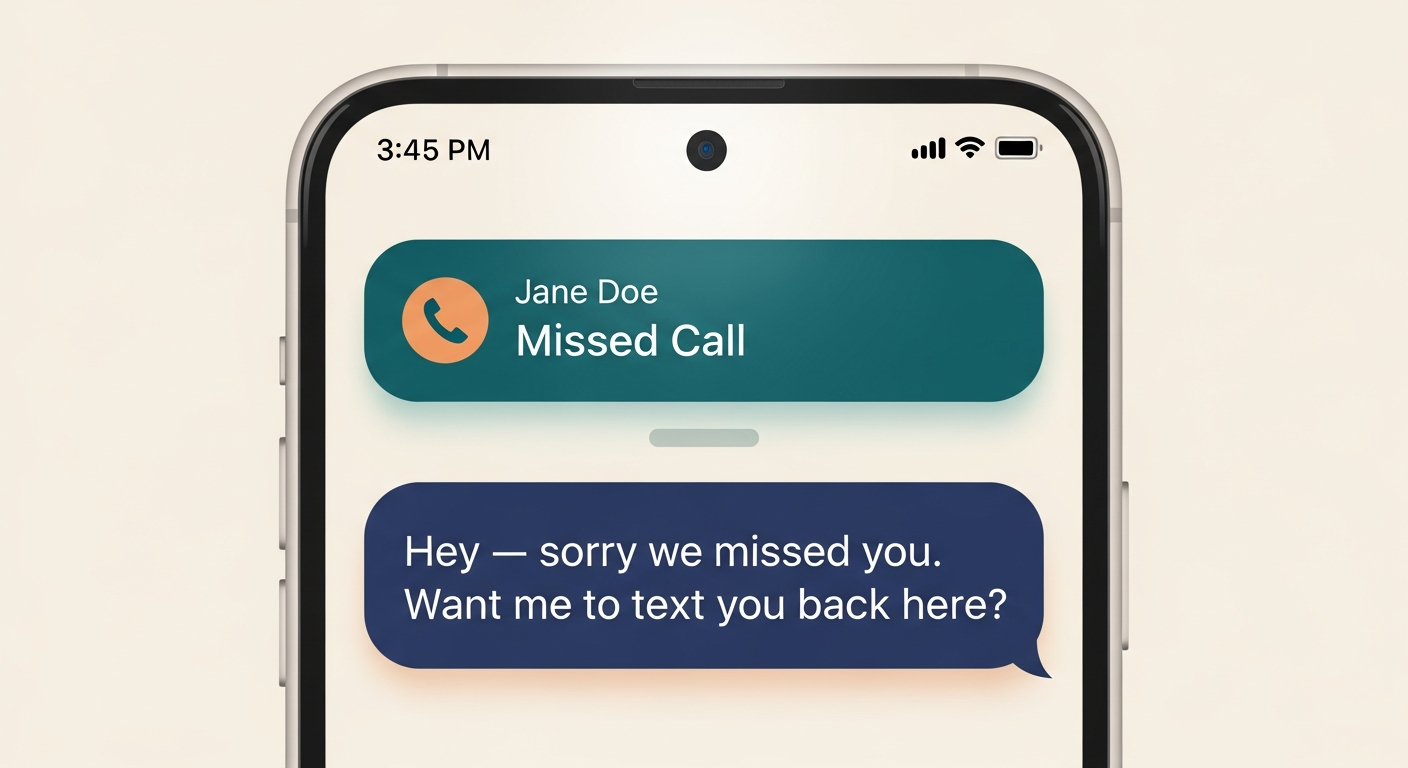
Missed Call Text Back in HighLevel automatically sends an SMS to any caller whose inbound call goes unanswered, so a missed call doesn't become a lost lead. You have two paths to set it up. The fastest is the native toggle inside your sub-account: turn it on, customize one message, and it's live for every missed call on your connected number — usually under 10 minutes. The more powerful path is a Workflow triggered by an inbound call with status "Missed," which lets you add follow-up messages, business-hour filters, tags, and routing. Most owners should turn the native toggle on today, watch what happens for a week, and only graduate to a Workflow once they want sequences. The feature itself is included on every HighLevel plan; you only pay per-message Twilio cost on top.
TL;DR
- •The native toggle is the fastest setup — under 10 minutes, no Workflow builder required.
- •Use a Workflow when you need follow-ups, business-hour filters, or tagging.
- •Included on every HighLevel plan; you pay per-SMS Twilio cost only.
- •Works on any GHL-connected (LC Phone) number; existing business numbers can be ported.
- •Pair it with a single follow-up message 30 minutes later — that combination converts noticeably better than the first SMS alone.
Contents
Table of Contents
Best fit for...
- •Local service businesses with phone-driven lead flow (HVAC, plumbing, dental, med-spa, contractors, fitness studios).
- •Owner-operators who can't pick up every call during a job.
- •Teams already paying for HighLevel and not yet using the inbox.
- •Anyone whose competitors will answer if you don't, within minutes.
Not the right fit if...
- •Your inbound flow is mostly form fills, not phone calls.
- •You're a high-touch enterprise sale where an automated text would feel cold.
- •You can't yet connect a phone number through HighLevel (LC Phone) for compliance or portability reasons.
- •You only get a handful of inbound calls per month — the lift will be too small to feel.
What Does HighLevel Actually Do?
HighLevel (sometimes called GoHighLevel or GHL) is an all-in-one platform for local-business operations and agencies that serve them. It bundles a CRM, a conversations inbox, calendars, funnels and websites, automations (Workflows), email and SMS marketing, courses and memberships, and a phone system that runs on Twilio under the hood. The reason Missed Call Text Back is a fit is that the phone, the inbox, and the automation engine all sit in the same place — so a missed call can trigger an SMS, that reply can land in the same inbox, and a follow-up sequence can take over without anything being stitched together. The headline benefit isn't any one feature; it's that the workflows you'd otherwise need three or four tools for can live in one account.
Missed Call Text Back, in plain English
When a customer calls your business number and you don't pick up, HighLevel automatically sends them a text message — typically within seconds. The reply lands in your HighLevel inbox like any other SMS thread, so you can keep the conversation going from your phone, your laptop, or a teammate's seat.
Why It Matters
Local-business research and operator surveys consistently estimate that 30–60% of inbound calls go unanswered. A missed call without a follow-up is a customer who is, statistically, calling the next business on the list. A single SMS within 60 seconds keeps you in the conversation.
One platform instead of four
The reason this small feature matters is because of what it lets you stop paying for. Most local businesses end up running three or four separate tools to do something HighLevel handles in one. Once Missed Call Text Back is live, the same account already has the inbox, the CRM contact record, and the automation engine queued up — so the next thing you build (a real follow-up sequence, a no-show recovery flow, a review request) doesn't require a new vendor.
Standalone missed-call-text tool
replaced by HighLevel's native toggle (e.g., NextPhone, Numa).
Shared team SMS inbox
replaced by HighLevel Conversations.
Lightweight CRM for local businesses
replaced by HighLevel's contacts module.
Zapier-style glue between phone and CRM
replaced by HighLevel Workflows.
Separate email tool for follow-up
replaced by HighLevel Email.
Review request software
replaced by HighLevel Reputation.
3 steps to live in 10 minutes
Connect a phone number
In your HighLevel sub-account, go to Settings → Phone Numbers. You can either purchase a fresh local number (cheapest path; takes about a minute) or port your existing business number (takes 1–3 weeks but keeps your brand recognition). Once connected, send yourself a test SMS from the inbox to confirm both directions work. If your business already advertises a number on a vehicle wrap or door sign, port it — Missed Call Text Back only works on calls that come into a HighLevel-connected number.
Turn on Missed Call Text Back
In the same sub-account, navigate to Settings → Business Profile (in some accounts the toggle lives under Settings → Phone Numbers → Missed Call Text Back). Flip the toggle to On, then customize the message that gets sent. Keep it short, friendly, and human. A reliable starting point: "Hey, this is [Name] at [Business] — sorry we missed your call. We'll get back to you within the hour. Anything we can help with by text?" Save. The feature is now live for every inbound call to your connected GHL number.
Test it before you trust it
From a phone that is not logged into HighLevel, call your connected number and let it ring through to voicemail. Within 15–30 seconds, the calling phone should receive the SMS. Then reply to that SMS — the reply should appear in Conversations inside HighLevel as a new thread. If it doesn't, the most common causes are (1) the toggle is enabled on a different sub-account than the one you're viewing, (2) the number isn't actually a HighLevel-connected LC Phone number, or (3) you tested from a phone that is logged into the same GHL account (the system suppresses self-tests).
What trips most owners up
The native toggle is genuinely 10-minute easy. The Workflow path is not. Most of the friction owners hit isn't the feature itself — it's the surrounding decisions. The first issue is after-hours behavior: the toggle texts every missed call, including 3am, which can feel weird if your message says "we'll call you back within the hour." The fix is either softening the copy to remove a time promise, or graduating to a Workflow with a business-hours filter. The second issue is repeat callers: the toggle texts the same person every time they call, which can read as automated. A small Workflow tweak — "only send if the contact hasn't been texted in the last 24 hours" — solves it. The third issue is reply handling: replies arrive in the Conversations inbox, but if no one is monitoring the inbox, you've just trained customers to text into a void. Assign someone (or yourself) before you turn this on.
Original Insights & Data
What one recovered call per week is worth
Imagine an HVAC business with a $400 average ticket and a 25% close rate on inbound calls. If 200 calls a month come in and 40% go to voicemail, that's 80 missed-lead conversations a month. Recovering even 10% of those — eight conversations — at the same close rate adds two booked jobs. At $400 average ticket, that's $800 in monthly revenue from a feature that costs essentially nothing beyond a few dollars in Twilio messaging fees.
Note: Numbers are illustrative. Use your real ticket size, close rate, and miss rate before sharing this internally.
The "second-text trap"
"Owners who add a second automated SMS immediately after the first one (a few seconds later) tend to see worse reply rates than owners who wait 20–30 minutes before any second message. The fast double-text reads as a bot; the delayed second message reads as a person actually trying to follow up. If you graduate to a Workflow, hold the second SMS for at least 20 minutes — and skip it entirely if the contact has already replied."
Note: This is an observed pattern from operator conversations, not a controlled study. Test with your own audience.
Native Toggle vs. Workflow: Which Setup Should You Use?
The right answer depends on how complex your follow-up needs to be.
Use the Native Toggle if:
- You want the fastest setup possible.
- You only need one instant SMS reply.
- You do not need business-hour logic.
- You do not need follow-up reminders.
- You are setting this up for a small local business that just needs to stop losing easy missed-call leads.
Use a Workflow if:
- You want different messages during business hours vs. after hours.
- You want a second follow-up if the caller does not reply.
- You want to tag missed-call leads automatically.
- You want to notify a team member.
- You want to route missed calls into a pipeline.
- You want to send booking links, review links, or service-specific follow-up.
Simple rule:Start with the native toggle if you want speed. Upgrade to a Workflow when missed calls need to become trackable sales opportunities.
What Should Your Missed Call Text Say?
The reader may know how to turn the feature on, but not what message to use. Here are proven starting points by use case.
"Hey, sorry we missed your call. This is [Business Name]. How can we help?"
"Sorry we missed you — want to text us what you need, or would you rather book a quick call here: [booking link]?"
"Sorry we missed your call. Are you looking for pricing, scheduling, or help with an existing job?"
"Thanks for calling [Business Name]. We're currently closed, but reply here and we'll follow up first thing in the morning."
Avoid these patterns
- Long paragraphs
- Overly automated language
- Asking too many questions at once
- Sending a booking link without context
The 3 Biggest Missed Call Text Back Mistakes
Mistake 1: Treating the first text like the whole system
The first text keeps the conversation alive. The follow-up process is what turns it into revenue. One message is a start, not a system.
Mistake 2: Sending every caller the same message forever
A first-time sales lead, existing customer, vendor, and repeat caller may all need different handling. Start simple, then segment.
Mistake 3: Not assigning ownership
If nobody is responsible for watching the Conversations inbox, the automation just moves the missed lead from voicemail into an ignored text thread. Assign someone before you turn this on.
Before and After Missed Call Text Back
- Missed calls sit in call history.
- The owner has to remember to call back.
- Leads call competitors within minutes.
- No one knows how many calls were missed.
- Follow-up depends entirely on memory.
- Every missed caller gets an immediate reply.
- The conversation is captured inside HighLevel.
- The team can see and respond from one inbox.
- Missed calls can be tagged and tracked.
- Follow-up becomes systematic, not reactive.
When Missed Call Text Back Is Not Enough
Missed Call Text Back is a great first step, but some businesses need more than a single automated SMS. Here's the escalation ladder.
You get frequent replies and need help answering common questions automatically without a human in the loop.
You miss a high volume of calls and need calls answered, qualified, or routed before they even hit voicemail.
You need follow-up sequences, team alerts, pipeline movement, or business-hour logic beyond one SMS.
The next best action after a missed call is almost always booking an appointment.
Feature Comparison
| Feature | HighLevel | Standalone MCTB tool | DIY (Twilio + Zapier + CRM) |
|---|---|---|---|
| Setup time | ~10 min | ~10–20 min | Hours; ongoing maintenance |
| Monthly base cost | From $97 (full platform) | $30–$80 (single feature) | $0–$40 + per-action Zapier cost |
| Per-SMS cost | Twilio at/near cost | Bundled or higher markup | Twilio at cost |
| Native follow-up sequences | Yes (Workflows) | Limited | Possible, but brittle |
| Conversations inbox | Yes | Usually | No — you build it |
| Replaces other tools | CRM, email, calendars, funnels | None | None |
| Best for | Owners who want one platform | Single-feature buyers | Tinkerers who already have Zapier |
Frequently asked questions about HighLevel
Is Missed Call Text Back included in the $97 Starter plan?
Will it text someone every time they call, even at 3am?
What's the difference between the native toggle and a Workflow?
Will customers think the text is spam?
Do I need Conversation AI to make this work?
Can I do this without HighLevel?
Final Thoughts
Missed Call Text Back is the rare automation where the simple version is the right version for almost everyone. Don't open the Workflow builder yet. Don't shop for AI add-ons. Connect a number, flip the toggle, write a friendly two-sentence message, test it from your personal phone, and let it run for a week. Most owners discover one of two things in that week: either they're missing more calls than they thought (in which case this feature is now indispensable), or they're missing fewer than they thought (in which case they've at least eliminated a worry). Either outcome is worth 10 minutes. Once you've seen the inbox fill up with conversations that would otherwise have been missed, the rest of HighLevel — Workflows, follow-up sequences, review requests — has earned the right to a serious look.
No credit-card commitment beyond the trial. Cancel anytime inside the first 14 days.

Written by
GHL Solution Editorial Team
HighLevel implementation team
We've set up Missed Call Text Back inside HighLevel for hundreds of local-service businesses, from solo operators to multi-location franchises.
Expertise
GHL Solution is an independent resource for owners and agencies running on HighLevel. We write the articles we wish we'd had when we were configuring the platform for the first time — practical, owner-to-owner, and honest about tradeoffs.
Read full bio →Keep Reading

HighLevel Pricing Explained: Starter vs. Unlimited vs. Agency Pro
Compare every HighLevel plan to find the right fit for your business or agency.

HighLevel Workflows for Beginners
A simplified guide to building your first automations in HighLevel.
HighLevel Conversation AI: A Practical Guide
How to use AI to handle your business conversations automatically.